Air Pro Psychrometric Calcs1.2
Publisher Description
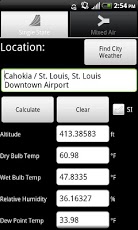
The anticipated upgrade to the most popular psychrometric calculator on Android!
Air Pro calculates all of your current local air properties upon start up and allows you to search for other city air properties. Air Pro also contains a mixed air calculator. Please view the video to see Air Pro in action.
Psychrometric calculator and mixed air calculator for HVAC professionals.
Psychrometric calculator for HVAC engineers, designers, technicians, commissioning agents, and maintenance personnel. SI and IP units are supported.
Inputs:
- Altitude
- Dry Bulb Temperature
And either:
-Wet Bulb Temperature
-Relative Humidity
- Dew Point Temperature
-Humidity Ratio
To Calculate:
-Wet Bulb Temperature
-Relative Humidity
-Dew Point Temperature
-Atmospheric Pressure
-Barometric Pressure
-Enthalpy
-Humidity Ratio
-Density
-Specific Volume
-Vapor Pressure
Calculations are made using The American Society of Heating Refrigeration and Air Conditioning Engineers (ASHRAE) Fundamentals 2009 ideal gas equations.
About Air Pro Psychrometric Calcs
The company that develops Air Pro Psychrometric Calcs is Cold Means Mobile Software, LLC. The latest version released by its developer is 1.2. This app was rated by 2 users of our site and has an average rating of 3.0.
To install Air Pro Psychrometric Calcs on your Android device, just click the green Continue To App button above to start the installation process. The app is listed on our website since 2013-07-07 and was downloaded 133 times. We have already checked if the download link is safe, however for your own protection we recommend that you scan the downloaded app with your antivirus. Your antivirus may detect the Air Pro Psychrometric Calcs as malware as malware if the download link to Psychro.Pro is broken.
How to install Air Pro Psychrometric Calcs on your Android device:
- Click on the Continue To App button on our website. This will redirect you to Google Play.
- Once the Air Pro Psychrometric Calcs is shown in the Google Play listing of your Android device, you can start its download and installation. Tap on the Install button located below the search bar and to the right of the app icon.
- A pop-up window with the permissions required by Air Pro Psychrometric Calcs will be shown. Click on Accept to continue the process.
- Air Pro Psychrometric Calcs will be downloaded onto your device, displaying a progress. Once the download completes, the installation will start and you'll get a notification after the installation is finished.
Program Details
System requirements
Download information
Pricing
Version History
version 1.2
posted on 2013-07-07
Version 1.1,Fixed city weather lookup function.,Fixed SI unit crash with DB and humidity ratio functions,Sped up app loading speed.,Version 1.2,Fixed number display issue affecting certain devices.
version 1.1
posted on 2013-03-24
Several fixes and updates
